

Ansible is an open source IT Configuration Management, Deployment & Orchestration tool. It aims to bring massive productivity gains to many automation challenges. This tool is very simple to use but powerful enough to automate complex multi-tier IT application environments.
1. What’s Ansible?
Ansible is defined as an open-source, cross-platform tool for resource provisioning automation that DevOps professionals popularly use for continuous delivery of software code by taking advantage of an “infrastructure as code” approach.
1.1. Why do we need Ansible?
When it comes to managing and automating tasks, Ansible is a great tool to use. Ansible is an automation tool for configuring and deploying applications on servers and in the cloud environment. It uses the YAML language to describe tasks and is used for configuring and deploying applications, services, and systems.
I have also worked with Helm charts and Terraform, but Ansible is particularly useful when deploying complex applications with specific requirements. Ansible provides powerful features for managing node servers, including configuration management, application and service deployment, managing software packages, and more.
Overall, I think Ansible is a great choice for managing and automating tasks, especially for complex applications and environments. Its features and flexibility make it a powerful tool for developers as well as system administrators.
1.2. Ansible Terms

Controller Machine: The server where Ansible is installed, responsible for executing processes and providing services on managed servers.
Inventory: An initialization file containing information about managed servers.
Playbook: The starting point for the Ansible service delivery process, where automation is defined through tasks using the YAML format.
Task: A block defining a single procedure to be executed, for example, install package.
Module: A module typically abstracts a task in the system, such as handling packages or creating and modifying files. Ansible has many built-in modules, but custom modules can also be created.
Role: A pre-defined way to organize playbook directories and other files for easy sharing and reuse of parts of the service delivery process.
Play: A service delivery process executed from start to finish is called a play. Simply put, executing a playbook is called a play.
Facts: Global variables containing information about the system, such as network interfaces or the operating system.
Handlers: Used to trigger state changes in services, such as restarting or stopping a service.
1.3. Advantages

Easy to use: Ansible uses simple and easy-to-understand YAML language, making writing and reading playbooks and configuration files straightforward.
Flexible automation: Ansible allows flexible automation of tasks and complex processes through playbooks, enabling customization and adjustment as needed.
No client software required: Ansible operates via SSH protocol and does not require client software installation on target servers, simplifying the deployment and management process.
Consistent execution: Ansible ensures tasks are executed consistently, meaning running a playbook multiple times does not alter the final state of the system. This maintains system stability and reliability.
Scalability: Ansible can manage and automate a large number of servers simultaneously, ensuring scalability and performance for large-scale environments.
Strong community support: Ansible benefits from a large and active user community, providing rich documentation, examples, and support. Users can easily find information, troubleshoot issues, and share experiences.
1.4. Ansible and Architecture
The architecture of Ansible is quite simple. Refer to the diagram below to understand the Ansible architecture.
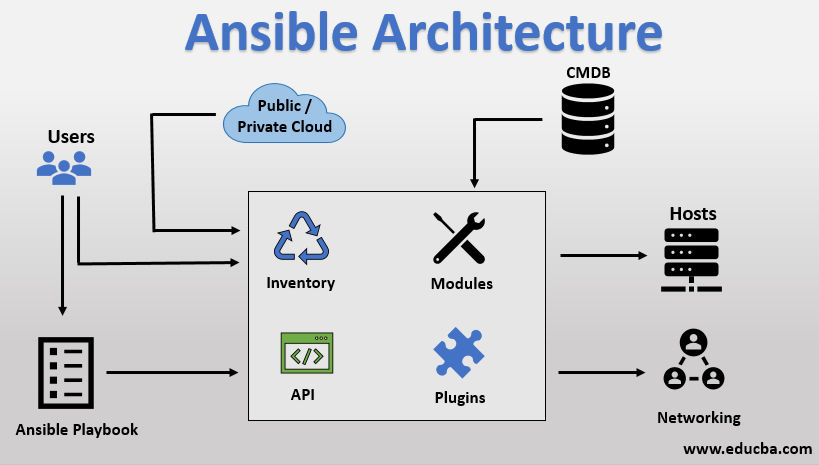
In the diagram above, the Ansible automation tool interacts directly with users to execute the Ansible Automation tool. It also interacts with cloud services and Configuration Management Database (CMDB).
The Ansible automation tool architecture includes the following components:
Inventories: Ansible uses inventories to store information about the servers and devices it manages as mentioned above. Each server is identified by an IP address or hostname and can belong to different groups. This helps Ansible identify the resources that need to be managed.
API: Ansible uses APIs to interact with cloud services or other tools. APIs allow Ansible to perform actions such as deploying virtual machines, managing cloud resources, or interacting with other systems.
Modules: Modules are core components in Ansible used to perform specific tasks on remote servers. Modules can control resources such as services, software packages, files, or execute system commands. Ansible provides over 450 different modules to automate various parts of the environment.
Plugins: Plugins provide additional functionality to Ansible, allowing for more complex tasks and extending Ansible’s capabilities. There are various types of plugins such as action plugins (perform tasks before calling modules), cache plugins (store collected information for performance enhancement), callback plugins (connect to Ansible events to display or log), and many other types.
Additionally, the Ansible architecture includes other components like Networking (network automation), Hosts (servers to be automated), Playbooks (describe tasks performed by Ansible), and CMDB (Configuration Management Database).
With this architecture, Ansible brings flexible and easy automation of system management and deployment for users.
2. Practice with Ansible
To start using Ansible, you will need to install it on a control node, this could be your laptop for example. From this control node, Ansible will connect and manage other machines and orchestrate different tasks
1
2
3
4
5
6
7
sudo apt-add-repository ppa:ansible/ansible
sudo apt-get update
sudo apt install python3-pip
sudo pip3 install pywinrm
sudo pip3 install pyvmomi
sudo pip3 install ansible
sudo pip3 install ansible[azure]
2.1. Demo requirements
Using Vagrant, Vmware or Cloud for Lab
- Refer: Install and Setup Vagrant
2.2. Project Directory Structure
1
2
3
4
5
6
7
8
9
10
11
├── ansible.cfg
├── group_vars
│   └── all
├── inventory
│   └── hosts.ini
├── playbook.yml
├── roles
│   ├── checking-hosts
│   │   └── tasks
│   │       └── main.yml
...
2.3. Ansible Inventory
For example post inventory: Ansible kubernetes
We can define groups of hosts like this
File inventory/hosts
1
2
3
4
5
6
7
8
9
10
host1 ansible_host=192.168.101.136
host2 ansible_host=192.168.101.137
host3 ansible_host=192.168.101.138

[webservers]
host1
host2

[databases]
host3
File ansible.cfg
1
2
3
4
5
6
7
8
9
10
11
12
13
14
15
16
17
[defaults]
gathering = explicit
force_color = true
localhost_warning = false
inventory = inventory/hosts.ini
roles_path = ./roles
retry_files_enabled = False
host_key_checking = False
interpreter_python = /usr/bin/python3
ssh_extra_args = -o StrictHostKeyChecking=no -o UserKnownHostsFile=/dev/null
remote_user = root
private_key_file=~/.ssh/id_rsa

[privilege_escalation]
become = True
become_user = vagrant
become_method = sudo
2.4. Ansible ad hoc Commands
Using ad hoc commands is a quick way to run a single task on one or more managed nodes.
1
ansible [host-pattern] -m [module] -a “[module options]”
Details flag
1
2
3
4
5
host-pattern: the managed hosts to run against

-m: the module to run

-a: the list of arguments required by the module
Let’s go ahead and execute a ping command against all our hosts:
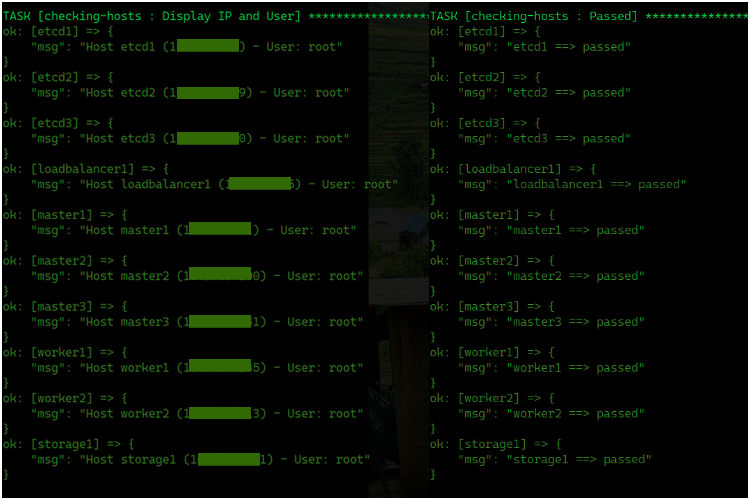
Nice, seems like we can successfully ping the hosts that we have defined in our hosts file.
2.5. Intro to Ansible Playbooks
Playbooks are the simplest way in Ansible to automate repeating tasks in the form of reusable and consistent configuration files. Playbooks are scripts defined in YAML files and contain any ordered set of steps to be executed on our managed nodes.
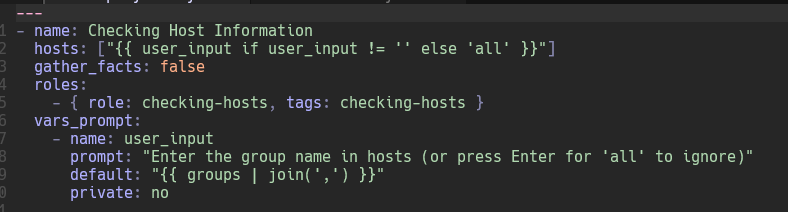
At the top, we define the server pool to run the playbook and its name using the user_input variable declaration. We then identify a list of servers to test.
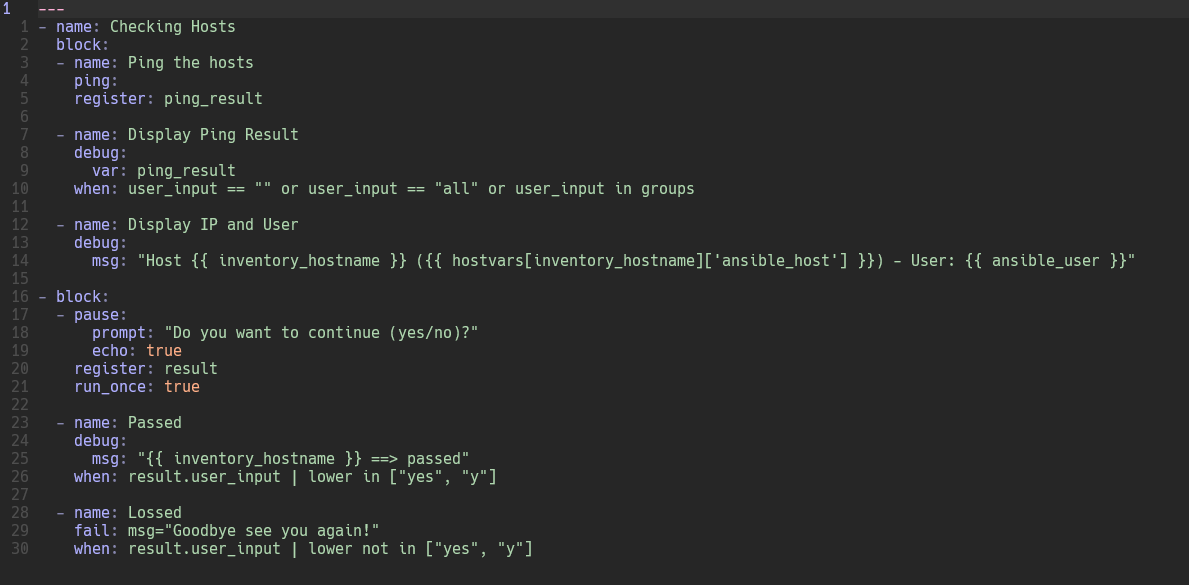
Then I define a list of tasks. Each task contains some information about the task and module to be executed along with the necessary arguments.
2.6. Using Variables in Playbooks
Variables can be defined in Ansible at more than one level and Ansible chooses the variable to use based on variable precedence.
1
2
3
4
5
6
7
...
  vars_prompt:
    - name: user_input
      prompt: "Enter the group name in hosts (or press Enter for 'all' to ignore)"
      default: "{ { groups | join(',') } }"
      private: no
...
2.7 Ansible Roles
Ansible roles take your automations to the next level of abstraction.
They are ideal for sharing functionality between different teams, environments, or projects, making your code DRY and enabling streamlined management of your IaC. With roles, you get a standardized structure for bundling related tasks, variables, templates, handlers, and files, and this enhances reusability.
3. Reference
- Ansible playbook with Kubernetes: Ansible Playbook with Kubernetes
Comments powered by Disqus.